Unit 3; Website Production Phases
Define structure, design, build and test, launch
Wed. April 7th, 2010.
--> Assignment: to redesign the Diana Downtown website. :)
http://www.dianadowntown.com/
Define Phase
- An interview with the client to understand things like the goals of the websites, audience, content, design and delivery requirements
- Organize and outline interview information to help define the site
Structure Phase
- Develop and communicate structure and organization of site based on interview and content
- Use a flowchart to organize information across site
- Use wireframes with simple shapes for buttons and graphics to show location of information on pages
- Show how site information will flow without providing too many details about each page
Design Phase
- Create visual comps to present the site brand or visual expression through colors, font, and images
- Leave comps rough, with room to change- enable client to participate in the design process
- Validate design choices against client goals and target audience
- Present at least 2 visual comps and describe how they meet audience goals, style, and delivery needs
- Incorporate client feedback, adding more content as client approves design elements
Build and Test Phase
- Create production storyboards to help define content and navigation
- Use page templates, library items, and styles to help teams build pages efficiently and with a consistent look
-Conduct a usability test to make sure the site is easy to use
-After testing, revise the site to fix technical errors and incorporate feedback from usability testers
Launch Phase
- Use effective page titles to help search engines that look for content
- Use alternative test for images to help search engines that look for images
- Submit to topic-specific search engines to promote the site
Wednesday, April 7, 2010

Tuesday, March 23, 2010
Note's Note's Note's
Here's a note from today's class about creating consistent pages when making a website!
Creating consistent content pages
Organizing Content:
- How your organize content on a page highlights important features and elements of your site
- Important elements might be higher in the page, larger in size, or in stronger colors
- Identifying common structures between pages helps visitors understand they are in the same site as they navigate from page to page
Questions to consider asking/referring to:
- Will your page banner be on each page? If yes, is it in the same place? Is it the same size?
- What font will you use for the titles or headings on your content pages?
- What color will you use font titles or headings on your content pages?
- What font will you use for descriptions on your content pages?
Navigation:
- Visitors need to know where they are in a site, where they need to go, and how to get back to where they came from
- Having a consistent layout grid helps orient visitors and keeps them from feeling lost.
- Using consistent buttons, links, and graphics on each page maintains a sense of place
- As visitors move from page to page, provide familiar visual cues and navigational aids
Questions to consider asking/referring to:
- Where will you place the navigation bar on the page? (Hint: Top not bottom so people don't have to scroll all the way down to the bottom!)
- What content will be on the navigation bar? (Hint: This should be the main area of the site! This is a very important question to think about! A website can be huge, but too much on a navigation bar can become far too much! Take apple's site for an example; they have many things but only 9 main things on the navigation bar!)
- Will the navigation bar be on every page? (Hint: most of the time, yes!)
- How will your navigation bar help visitors know which page they are on?
Creating consistent content pages
Organizing Content:
- How your organize content on a page highlights important features and elements of your site
- Important elements might be higher in the page, larger in size, or in stronger colors
- Identifying common structures between pages helps visitors understand they are in the same site as they navigate from page to page
Questions to consider asking/referring to:
- Will your page banner be on each page? If yes, is it in the same place? Is it the same size?
- What font will you use for the titles or headings on your content pages?
- What color will you use font titles or headings on your content pages?
- What font will you use for descriptions on your content pages?
Navigation:
- Visitors need to know where they are in a site, where they need to go, and how to get back to where they came from
- Having a consistent layout grid helps orient visitors and keeps them from feeling lost.
- Using consistent buttons, links, and graphics on each page maintains a sense of place
- As visitors move from page to page, provide familiar visual cues and navigational aids
Questions to consider asking/referring to:
- Where will you place the navigation bar on the page? (Hint: Top not bottom so people don't have to scroll all the way down to the bottom!)
- What content will be on the navigation bar? (Hint: This should be the main area of the site! This is a very important question to think about! A website can be huge, but too much on a navigation bar can become far too much! Take apple's site for an example; they have many things but only 9 main things on the navigation bar!)
- Will the navigation bar be on every page? (Hint: most of the time, yes!)
- How will your navigation bar help visitors know which page they are on?
New Assignment Time!
Time to buckle on down!
About that 5 page wesite project that I'm starting; I'll tell you a bit about it.
Who knows?
Maybe you're just bored and can use this type of an assignment to keep you busy or for practise!
:D
As they say; practise makes perfecttttttttttttt !
______________________________________________________________
Our assigment is called: A Personal Webpage of a Canadian High School Student
______________________________________________________________
Your Task: You will describe your experience by building and publishing a five page web site. Create a folder in your Internet & Web Pages folder (your lastname) to contain your Web site as you develop it.
First Page:
You will have a Home Page (title) with filename index.htm which introduces yourself and explains the purpose of the site. To understand your view of the world people need to know something about you. How old you are, what languages you speak, what your interests are. They need to know a little about your environment, what is Brampton like, how do you travel and where. They need to know where you are in your schooling and what your goals may be. All this seems normal to you, but it can be fascinating to someone from a distant country. Your life is interesting; part of your job is to convey that interest to your reader.
Second Page:
Your second page describes your School Life (title) with filename school.htm. Things to consider are: − What subjects do you study & why? − What are your Post Secondary and Career interests? − What is your homework like? How long does it take? − What are your tests & exams like? Hard/easy, how important? − What is your social life like at school? How do students groups interact? − Are there clubs or sports teams that you are involved with?
Third Page:
Your third page describes your Home & Social life (title) with filename home.htm. Things to consider are: − Do you live in the country or in town? Describe it. − How many brothers and sisters do you have? − How are family tasks shared? − What happens during holidays? − When do you do your homework? − What do you like to do with your free time? − What hobbies and activities do you have? − Do you work part time? If so, what do you do? How does this impact on your school work?
Fourth Page: (blog)
Your fourth page will be updated on a weekly basis. It will be a personal Journal or a Blog. This blog can be about anything you like but should be mostly school related and appropriate. You will be expected to keep this page maintained as you go through this semester. Remember: A journal always has the date it was posted. Things to write about in your blog: Personal events you may want to share with the class What's happening in you classes? What are you learning? How are you post-secondary plans going? How is your sports/club going?
Fifth Page: (links)
Your page will contain some external links for a person to investigate further if the want more information. You should include a brief synopsis (summary) of what the link is about so the person knows what they are linking to. Make sure the link opens in a new page Things you may want to link to : • The Fletchers Meadow Website • Ministry of Education website • Mr. Harrison's website • A site about study tips • A site about how to be successful as a student • Study tips • Career exploration • Co-op exploration • Post-Secondary School Information
Components Your Site Must Have:
Your project will be partially judged on how interesting the page content is. But in addition, you must show that you understand basic web site construction by including the following elements in it: − Write and insert an effective title for your home page in Photoshop. - Have a custom background - Have at least on rollover button − Structure text effectively on your page using tables − Import at least one customized image per page to support your story line. − Control your text and image placement in relation to objects using tables − Link your pages together so that the reader can easily travel back and fourth between them.
About that 5 page wesite project that I'm starting; I'll tell you a bit about it.
Who knows?
Maybe you're just bored and can use this type of an assignment to keep you busy or for practise!
:D
As they say; practise makes perfecttttttttttttt !
______________________________________________________________
Our assigment is called: A Personal Webpage of a Canadian High School Student
______________________________________________________________
Your Task: You will describe your experience by building and publishing a five page web site. Create a folder in your Internet & Web Pages folder (your lastname) to contain your Web site as you develop it.
First Page:
You will have a Home Page (title) with filename index.htm which introduces yourself and explains the purpose of the site. To understand your view of the world people need to know something about you. How old you are, what languages you speak, what your interests are. They need to know a little about your environment, what is Brampton like, how do you travel and where. They need to know where you are in your schooling and what your goals may be. All this seems normal to you, but it can be fascinating to someone from a distant country. Your life is interesting; part of your job is to convey that interest to your reader.
Second Page:
Your second page describes your School Life (title) with filename school.htm. Things to consider are: − What subjects do you study & why? − What are your Post Secondary and Career interests? − What is your homework like? How long does it take? − What are your tests & exams like? Hard/easy, how important? − What is your social life like at school? How do students groups interact? − Are there clubs or sports teams that you are involved with?
Third Page:
Your third page describes your Home & Social life (title) with filename home.htm. Things to consider are: − Do you live in the country or in town? Describe it. − How many brothers and sisters do you have? − How are family tasks shared? − What happens during holidays? − When do you do your homework? − What do you like to do with your free time? − What hobbies and activities do you have? − Do you work part time? If so, what do you do? How does this impact on your school work?
Fourth Page: (blog)
Your fourth page will be updated on a weekly basis. It will be a personal Journal or a Blog. This blog can be about anything you like but should be mostly school related and appropriate. You will be expected to keep this page maintained as you go through this semester. Remember: A journal always has the date it was posted. Things to write about in your blog: Personal events you may want to share with the class What's happening in you classes? What are you learning? How are you post-secondary plans going? How is your sports/club going?
Fifth Page: (links)
Your page will contain some external links for a person to investigate further if the want more information. You should include a brief synopsis (summary) of what the link is about so the person knows what they are linking to. Make sure the link opens in a new page Things you may want to link to : • The Fletchers Meadow Website • Ministry of Education website • Mr. Harrison's website • A site about study tips • A site about how to be successful as a student • Study tips • Career exploration • Co-op exploration • Post-Secondary School Information
Components Your Site Must Have:
Your project will be partially judged on how interesting the page content is. But in addition, you must show that you understand basic web site construction by including the following elements in it: − Write and insert an effective title for your home page in Photoshop. - Have a custom background - Have at least on rollover button − Structure text effectively on your page using tables − Import at least one customized image per page to support your story line. − Control your text and image placement in relation to objects using tables − Link your pages together so that the reader can easily travel back and fourth between them.
I'm Back!
Back after a not long enough march break D:
But I still love coming to this web design class!
I tend to get more work done in this class than in more others I attend :P
Today's powerpoint is just learning some points about consistency when creating your own websites to keep in mind.
We're right now on an assignment where we are to create a 5 page website!
I also just heard about the whole Google being banned in China! O:
Crazzzzzzyyyyyyy stuff ! If you hadn't heard about it; google it up! 8]
And here's a link to the offical google blog about it too; http://googleblog.blogspot.com/
But I still love coming to this web design class!
I tend to get more work done in this class than in more others I attend :P
Today's powerpoint is just learning some points about consistency when creating your own websites to keep in mind.
We're right now on an assignment where we are to create a 5 page website!
I also just heard about the whole Google being banned in China! O:
Crazzzzzzyyyyyyy stuff ! If you hadn't heard about it; google it up! 8]
And here's a link to the offical google blog about it too; http://googleblog.blogspot.com/
Wednesday, March 10, 2010
Planning a Portfolio
Purpose and Audience:
-What is the:
Purpose of the site?
Who is the audience
How does both the graphics and text play into the design?
Portfolios:-To reflect your personality or your brand.
-Creating a portfolio to portray yourself
-What is a portfolio?
-Basically a group of images, things you do or are working on and works in progress that show your talent (not only your final works, but the works in progress!)
-Portfolio's can show your initial work, your drafts,
-What is the goal of your portfolio?-To get a job as a web designer, to get into a film program, ect.
Questions to ask about portfolios or to think about:
- What is a portfolio?
- What are the goals of a particular portfolio?
- What else does a portfolio contain?
- Would it contain professional experience? Coursework?
- How do you use a portfolio to communicate ideas?
-What could you use to communicate these ideas (for ex: images, text, design of homepage, organization of the portfolio)?
- What are the long-term and the short-term goals of a portfolio?
- Who is the audience for the portfolio?
Purpose and Audience:
-What is the:
Purpose of the site?
Who is the audience
How does both the graphics and text play into the design?
Portfolios:-To reflect your personality or your brand.
-Creating a portfolio to portray yourself
-What is a portfolio?
-Basically a group of images, things you do or are working on and works in progress that show your talent (not only your final works, but the works in progress!)
-Portfolio's can show your initial work, your drafts,
-What is the goal of your portfolio?-To get a job as a web designer, to get into a film program, ect.
Questions to ask about portfolios or to think about:
- What is a portfolio?
- What are the goals of a particular portfolio?
- What else does a portfolio contain?
- Would it contain professional experience? Coursework?
- How do you use a portfolio to communicate ideas?
-What could you use to communicate these ideas (for ex: images, text, design of homepage, organization of the portfolio)?
- What are the long-term and the short-term goals of a portfolio?
- Who is the audience for the portfolio?
Analyzing Websites
Consistency and Hierarchy
- How to promote consistency and hierarchy
- Placement of the navigation scheme
- Use of color
- Use of fonts (colors, emphasis, and size)
- Use of headings (H1, H2 ect)
Website Analysis Techniques
- Design
- Content (Is the content useful?)
- Visual Layout (Layout of the screen; job of a web designer)
- Bias
- Consistency Structures'
- Currency (How current is it? It is up to date? Is it 5 years old?)
- Color Scheme
- Source (Whose writing it?)
- Visual Hierarchy Elements
- Ability to confirm information
Consistency and Hierarchy
- How to promote consistency and hierarchy
- Placement of the navigation scheme
- Use of color
- Use of fonts (colors, emphasis, and size)
- Use of headings (H1, H2 ect)
Website Analysis Techniques
- Design
- Content (Is the content useful?)
- Visual Layout (Layout of the screen; job of a web designer)
- Bias
- Consistency Structures'
- Currency (How current is it? It is up to date? Is it 5 years old?)
- Color Scheme
- Source (Whose writing it?)
- Visual Hierarchy Elements
- Ability to confirm information
CSS: Cascading Style Sheets
Huh? Why do I have to use this?
- CSS provides great control over the layout and design of web pages.
- You can format text, add margins, create columns, and add borders to images, control th look and behavior of links, and much more.
- Design consistent-looking pages
- Enable site- wide changes
Huh? Why do I have to use this?
- CSS provides great control over the layout and design of web pages.
- You can format text, add margins, create columns, and add borders to images, control th look and behavior of links, and much more.
- Design consistent-looking pages
- Enable site- wide changes
Intro to Graphic Design!
Here's some points if your new to graphic design :)
Graphic Design Elements :Graphic design elements are the building blocks of graphics
They Include:
-Line
-Shape
-Texture
-Colour
Line:-Lines can be straight or curved
Colour:-Hue is another word for colour
-Chroma is the intensity or purity of the colour
-Tint is a colour mixed with white
-Tone is when a colour is mixed with gray
-Shade is a colour mixed with black
Colour and Contrast:-Colour wheels help determine which colors are in greatest contrasts
-using colour can enhance your design
-site for designing: kuler.adobe.com/
-Analogous colours are adjacent (beside) to each other on the colour wheel
-Complementary colours are opposite to each other on the colour wheel
-Complementary colours will both stand out without taking away from each other
Shapes:shapes are enclosed objects that can be created by line or created by colour and value changes that defines their edge
shapes are powerful and brands
Graphic Design Principles:=Graphic design principles are ways in which elements are used together.
-Movement
-Balance
-Emphasis
-Unity
[These are the 4 majors]
Movement:=Movement is the use of lines, color and repitition to create the illusions of motion
-Curved forms or lines
-Repitition of geometric forms
-Fuzzy lines or outlines
Lines:
=Lines can indicate motion or direction
Balance:=Balance is the act of comparing or estimating two things, one against the other, and the contrast between.
-Empty space (white space) and filled space
-Text and images
-Color and no colors and different colors
-Texture against flat colors
Balance in Composition:
=There are 3 different types of balance when using color, shape and position
- Symmetry, Asymmetry, Radial Symmetry
Unity:
=Unity: The correct balance of composition or color that produces a harmonious effect
Emphasis:=Emphasis: To express with particular stress or force
Here's some points if your new to graphic design :)
Graphic Design Elements :Graphic design elements are the building blocks of graphics
They Include:
-Line
-Shape
-Texture
-Colour
Line:-Lines can be straight or curved
Colour:-Hue is another word for colour
-Chroma is the intensity or purity of the colour
-Tint is a colour mixed with white
-Tone is when a colour is mixed with gray
-Shade is a colour mixed with black
Colour and Contrast:-Colour wheels help determine which colors are in greatest contrasts
-using colour can enhance your design
-site for designing: kuler.adobe.com/
-Analogous colours are adjacent (beside) to each other on the colour wheel
-Complementary colours are opposite to each other on the colour wheel
-Complementary colours will both stand out without taking away from each other
Shapes:shapes are enclosed objects that can be created by line or created by colour and value changes that defines their edge
shapes are powerful and brands
Graphic Design Principles:=Graphic design principles are ways in which elements are used together.
-Movement
-Balance
-Emphasis
-Unity
[These are the 4 majors]
Movement:=Movement is the use of lines, color and repitition to create the illusions of motion
-Curved forms or lines
-Repitition of geometric forms
-Fuzzy lines or outlines
Lines:
=Lines can indicate motion or direction
Balance:=Balance is the act of comparing or estimating two things, one against the other, and the contrast between.
-Empty space (white space) and filled space
-Text and images
-Color and no colors and different colors
-Texture against flat colors
Balance in Composition:
=There are 3 different types of balance when using color, shape and position
- Symmetry, Asymmetry, Radial Symmetry
Unity:
=Unity: The correct balance of composition or color that produces a harmonious effect
Emphasis:=Emphasis: To express with particular stress or force
Wednesday, February 17, 2010
Pictures, Pictures, Pretty Pictures!Heeeyy ! Okay, so I forgot to updatee ^^'


Hint: GIF images are better for simpler images like graphics or logo's with solid colors!
Seconddddd is JPG/ JPEG

Hint: Even though it can't be animated, it's got GREAT quality! Wouldn't you agree? I mean that picture of 2NE1 & BigBang looks FAB!

Hint: A PNG image has great quality, but it can't be animated like a GIF. However, it looks great on websites since it DOES support transparency! :)
But no worries, you will now learn the file types for graphics! :)
Theme: 2ne1 ! =)
Firstttttt is GIF, which stands for (Graphic Interchange Format) 
Hint: GIF images are better for simpler images like graphics or logo's with solid colors!

Hint: Even though it can't be animated, it's got GREAT quality! Wouldn't you agree? I mean that picture of 2NE1 & BigBang looks FAB!

Hint: A PNG image has great quality, but it can't be animated like a GIF. However, it looks great on websites since it DOES support transparency! :)
Thursday, February 4, 2010
`Greetings!~
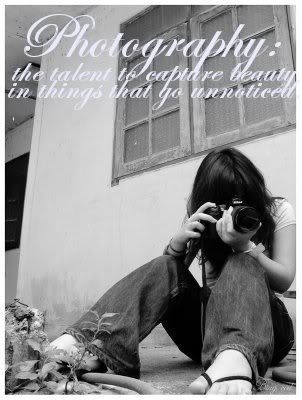 Hello! Welcome to my Blog!
Yes yes, I'm a newbie, but I'll get better in time, hopefully.
The name's Brittany; although I've got more nicknames than I can count! =)
I'm starting up this blog is for my Web Design class that I'm currently in. My blog is my assignment (to update weekly), so I'm hoping to post some fun stuff, as well as educational things about my course! That way you can pick up some interesting tips & pictures of my own to view!~
Lemme tell you a little bit about moi. I'm a camera LOVER! I own a NikonD5000 & it's my most prized possession! I'm in LOVE with photography. Its' my passion~ I'm always trying out new things, so if you ever have any tips, feel free to let me know! =)
Till next time!~
P.s. That girl in the picture is NOT me! Just incase you thought it was =)
Subscribe to:
Posts (Atom)